How I Built a Remote Wake and Shutdown Server for My PC
Overview and Design Rationale
I am currently the proud creator of a homelab, which consist of exactly one raspberry pi 5 (RPI5) directly connected to my box via ethernet. I came to the realization that it might not be a hardware powerful enough to realized my future project, consisting of a hosting a remote gaming server and also a LLM server. Instead of buying new hardware I decided to make something out of my tower PC sleeping silent in a corner of my apartment. However I did not want this PC to run 24/7 as it might get quite loud and my apartment is quite small.
That is why I decided to go on this small project with the following requirement:
- I should be able to start my PC from anywhere with a simple UI
- I should be able to shutdown my PC from anywhere with the same UI
- I should be able to schedule the shutdown of my PC
- My PC should shut down automatically 2 hours after starting (in case I forget to shut it down)
I decided to go with this high level design:
    ---
config:
    look: handDrawn
    theme: neutral
---
graph LR
    subgraph RPI5 [RPI 5]
        schedule[Schedule Server]
    end

    subgraph PC [PC]
        shutdown[Shutdown Server]
    end

    user --> schedule
    schedule --HTTP--> shutdown
    schedule --Wake-On-Lan--> PC
Here the user would be served an webpage by the scheduler. the scheduler would then send a Wake-On-Lan packet to wake up the PC if requested to start the computer. It will send a HTTP POST request to the shutdown server on the PC if requested to schedule a shutdown. I decided to place all the schedule logic on the RPI5. Since the RPI5 is always up. It is more convenient to handle schedule logic even before the PC has started booting.
I decided to implement both server in Go as i am used to this language and can create fast prototype with it.
Implementation
Wake On LAN (WoL)
First step is to configure Wake-On-LAN on your PC. I use Arch (btw) so I followed the Arch Wiki.
Then from my schedule server, you can send a WoL packet this way:
func sendWOL(mac string) error {
	hw, err := net.ParseMAC(mac)
	if err != nil {
		return fmt.Errorf("invalid MAC address: %w", err)
	}
	// Basic wake packet
	packet := make([]byte, 102)
	for i := 0; i < 6; i++ {
		packet[i] = 0xFF
	}
	for i := 1; i <= 16; i++ {
		copy(packet[i*6:], hw)
	}
	// Send UDP broadcast
	conn, err := net.Dial("udp", "255.255.255.255:9")
	if err != nil {
		return err
	}
	defer conn.Close()
	_, err = conn.Write(packet)
	return err
}
Note that you should be on the same network in order to send it to the PC. If you run the binary in docker, then do not forget to add run the docker in network mode:
network_mode: "host"
Shutting down the server
On the scheduler side, all is needed is to keep track of when to send the shutdown request to the shutdown-server. From a go perspective, this consist of storing the UTC date in a file, creating a goroutine that wakes up only when the stored time is over, and send the message the the shutdown server.
The shutdown server was a bit more tricky. After spending quite some time to try to make it work in a docker, I decided to make it run directly on the host with systemctl.
[Unit]
Description=Minimal HTTP Shutdown Server
After=network.target

[Service]
User=shutdown-server
ExecStart=/usr/local/bin/shutdown-server --ip=$MYIP --port=$MYPORT
Restart=on-failure

[Install]
WantedBy=multi-user.target
This is the entire server, written in go.
package main

import (
	"flag"
	"fmt"
	"log"
	"net/http"
	"os/exec"
)

func shutdownHandler(w http.ResponseWriter, r *http.Request) {
	if r.Method != http.MethodPost {
		http.Error(w, "Method not allowed", http.StatusMethodNotAllowed)
		return
	}

	log.Println("Shutdown requested. Executing shutdown -h now")
	err := exec.Command("sudo", "/sbin/shutdown", "-h", "now").Run()
	if err != nil {
		log.Printf("Shutdown failed: %v", err)
		http.Error(w, "Failed to shutdown", http.StatusInternalServerError)
		return
	}

	w.WriteHeader(http.StatusOK)
	w.Write([]byte("shutdown command succeed"))
}

func main() {
	port := flag.Int("port", 8080, "Port to listen on")
	ip := flag.String("ip", "0.0.0.0", "Ip to listen on")
	flag.Parse()
	http.HandleFunc("/shutdown", shutdownHandler)

	addr := fmt.Sprintf("%s:%d", *ip, *port)
	log.Printf("Listening on %s\n", addr)
	log.Fatal(http.ListenAndServe(addr, nil))
}
In order for this server to call shutdown -h now you should create the shutdown-server user and allow this user to execute shutdown without password:
SERVICE_NAME=shutdown-server
sudo useradd --system --no-create-home --shell /usr/sbin/nologin "$SERVICE_NAME"
echo "$SERVICE_NAME ALL=(ALL) NOPASSWD: /sbin/shutdown" | sudo tee /etc/sudoers.d/$SERVICE_NAME > /dev/null
sudo chmod 440 /etc/sudoers.d/$SERVICE_NAME
Final Result
After vibe coding a web page for interacting with my schedule server (front end is not my cup of tea yet), I came up with an satisfactory result:
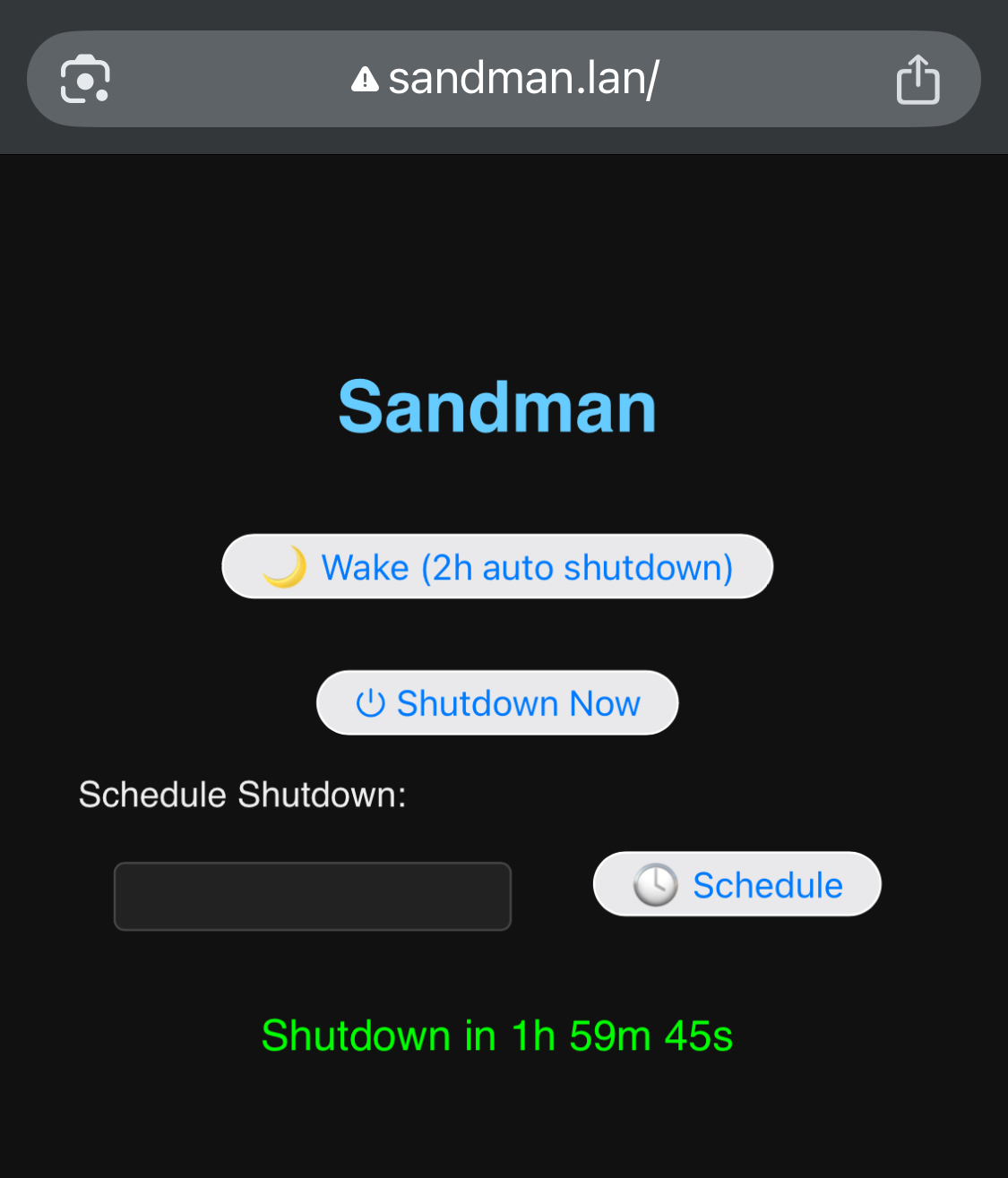
As you can see from the domain name, I called this project sandman because it makes the PC computer fall asleep. This Webpage can only be accessed from my local network. There is plenty of way (secure or not) to expose it to the internet. Since I wanted not to open any port on my box, I decided to use tailscale tunnels with a self hosted headscale.